The following changes have been made to the Courts Portal on 11/02/2026.
If you have any feedback or questions in relation these changes or you need support using the portal, please contact portal@courts.ie
New Landing Page
A new landing page now provides clearer information about what you can do in the portal and how to get started:
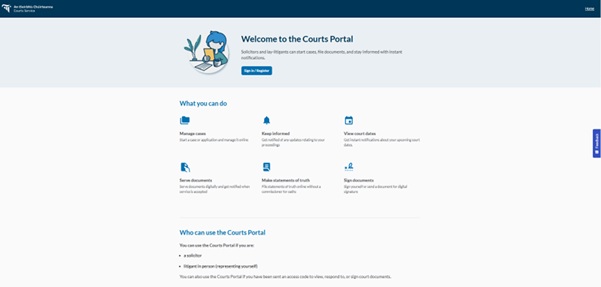
New Home Page
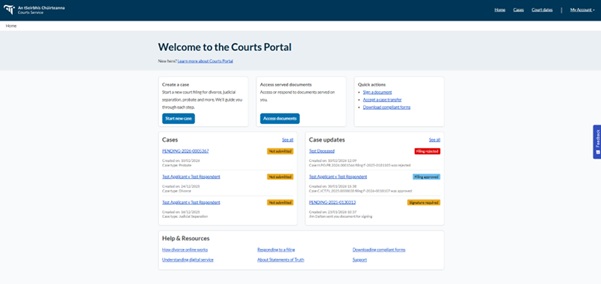
The Home page has been redesigned to make key actions more visible and easier to access.
You will now see:
- Prominent quick actions such as Start new case, Access served documents, and Sign a document
- A direct link to download all portal-compliant templates, allowing you to prepare documents in advance of filing
- A link to a basic introduction to the portal for new users
- An expanded Help & Resources section, including guidance on:
- Applying for divorce online
- Serving documents filed through the portal
- Statements of Truth
- Filing a response in a divorce case
- Accessing portal support
The Home page also displays:
- Your recent cases
- The three most recent case updates
- “See all” links to view all cases and all case updates
Please note that “Listings” has been renamed to “Court dates” for clarity.
Signing Documents
You can now view all documents awaiting your signature in one place.
By selecting “Sign a document” on the Home page:
- Documents awaiting your signature are displayed first
- Previously signed documents are listed below, starting with the most recent
This provides a clearer overview of outstanding and completed signing actions.
Service of Documents
We have made a number of improvements relating to service:
- Enhanced information is now included in the email notification sent when documents are served digitally
- Additional guidance is provided when accessing documents that were served physically
- When serving documents, the portal now clearly highlights both available options:
- Digital service
- Physical service
These updates are intended to provide greater clarity around the available methods of service.
Starting a New Circuit Family Case
When initiating a new Circuit Family case, you will now experience a more guided process. The portal will:
- Provide additional information about the application process and eligibility criteria
- Display a list of required and commonly submitted optional documents
- Provide links to the relevant portal-compliant templates for each document required
Case Information Updates
Several items within the case detail view have been renamed for clarity:
- Case → Case overview
- Filings → Filed documents
- Listings → Court dates
- Orders → Court Orders
In addition:
- The case title is now displayed once the initiating document has been uploaded and signed, making cases easier to identify on the Home and Cases pages
- The case type is now displayed on the Cases page
Onboarding Improvements
- The firm search function during registration has been enhanced. The portal now searches as you type, allowing you to locate your firm using part of its name.
- For clarity, the registration option previously labelled “Yes, I am a solicitor” has been updated to “Yes, I am a solicitor/legal executive.”


